 PRODUCT LAUNCH
A launch introduction
Pair a concise presenter opening with real footage of the new feature.
Turn actual screen recordings into a product story people can follow. Add a clear introduction, supporting visuals and well-timed titles, then edit a version for each launch channel.
Explore free, no card required. A paid plan is required to generate and export.

Creator openingProduct storyFinal frame
Your headline goes here
Open with the problem. Show one real product action. End with the result and a clear next step.
Upload actual product screenshots and recordings
Add titles and your own audio to explain each step
Export versions for the feed, a story, or a product launch
Keep the brief, the creative decisions and the final edit connected.
Capture the real interface and one focused task. Upload the recording and any screenshots to your Mozify workspace.
Add a presenter introduction or supporting imagery. Write titles that explain the action instead of covering important interface details.
Trim the pauses, set the pace and export the canvas your channel needs. Review interface legibility in the final file.
A little preparation gives each creative step a clearer direction.
Build a set of assets that supports the message, from the opening frame to the final call to action.
PRODUCT LAUNCHPair a concise presenter opening with real footage of the new feature.
CAMPAIGN VISUALUse original supporting artwork for a campaign, while showing actual captures whenever you demonstrate the interface.
 STORY DIRECTION
Set the context for the problem your app solves with supporting visual concepts.
Original illustrative campaign concepts. Fictional products and presenters.
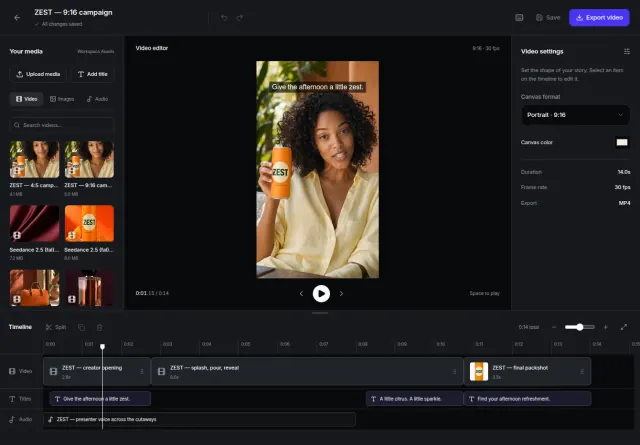 Inside Mozify / sample campaign workspace
Keep a longer product walkthrough and make focused versions from the same recording. Use the opening title to frame a different use case, and let the real interface do the explaining.
Keep the message in frame. The Editor supports four canvas formats; preview the crop before exporting each version.
Use real captures when demonstrating how your product works. AI can help with supporting campaign imagery, while the Editor combines those visuals with your real interface.
Bring your brief into Mozify and take the first step.
Build your product demo ↗Explore free, no card required. A paid plan is required to generate and export.