Mozify vs Topview: AI Agents & Video Workflows
Turn an AI plan into creative decisions you can review.
An AI video agent can help turn a loose idea into a plan. The next decisions matter just as much: which assets to create, which model to use, when to spend credits and how to finish the sequence. Mozify gives those decisions a place in Agent, the studios, Workflows and the Editor. Here is how to evaluate that approach alongside Topview.
Explore free, no card required. A paid plan is required to generate and export.
Turn an AI plan into creative decisions you can review.
Choose Mozify when you want AI help with the brief and direct access to the generation and editing steps. You can review a plan, work in a studio, save a repeatable flow and arrange selected takes on a timeline.
- Review the plan and generation estimates
- Open a studio when a shot needs direct attention
- Save repeatable steps and finish the timeline
When Topview may fit
Topview is worth evaluating when you prefer an agent-driven Canvas that keeps scene plans, references and generated assets together in a visual project. [2]
See the side-by-side comparison ↓Mozify vs Topview: the workflow comparison
| Your task | Mozify | Topview |
|---|---|---|
| Planning | Agent works from your brief and supports approval preferences. | Video Agent plans scenes from ideas or supplied inputs. [1] |
| Production structure | Separate studios, a Workflows canvas and an Editor timeline. | Canvas groups scenes, references and assets visually. [2] |
| Shot development | Select a profile, supported inputs and output settings in a studio. | Ask the Canvas agent to refine selected areas or scenes. [2] |
| Organizing results | Workspace Assets stores references and selected output files. | Board organizes model outputs for review and reuse. [1] |
Official product information reviewed 12 October 2026. Model access and plan allowances can change.
Put a clear decision between the brief and production
In Mozify Agent, explain the product, audience and deliverable. Add useful references and say what should stay consistent. Agent preferences let you choose an approval mode; Ask before creating is useful when you want to review the proposed work and estimate before proceeding.
For a client brief, that review can focus on practical questions: does the opening show the product soon enough, is a new image needed, and can an existing clip cover one of the shots? Refining the plan is valuable before you create a collection of assets that the final edit will not use.
Topview also describes reviewing agent suggestions and refining selected scenes on Canvas. Both approaches allow direction; the difference to evaluate is how your team wants to organize those decisions. [2]
See how Mozify Agent works ↗Work directly on the shot that needs attention
A plan may be good while one asset still needs work. Open Image Studio to revise a product scene, or Video Studio to prepare the motion. Select the model profile and input mode that fit the material, then adjust the supported settings and review the quote.
This gives a creator a direct place to resolve a specific issue: the product is too small in frame, the motion needs to be restrained, or the final shot needs more space for a title. Keep the shots that already fit. Choose a new generation for the part of the story that needs different content.
Explore video models and their inputs ↗Make recurring production steps reusable
When a process becomes recurring, move the repeatable steps into a saved Mozify Workflow. Connect references, planning and generation nodes, then use a new brief for the next run. Inspect the outputs before deciding which ones belong in the edit.
The final ad still needs timing. In the Video Editor, arrange the selected clips, titles and audio around the message. This separation lets your workflow handle repeatable production while the timeline carries the decisions about pace, transitions and the closing frame.
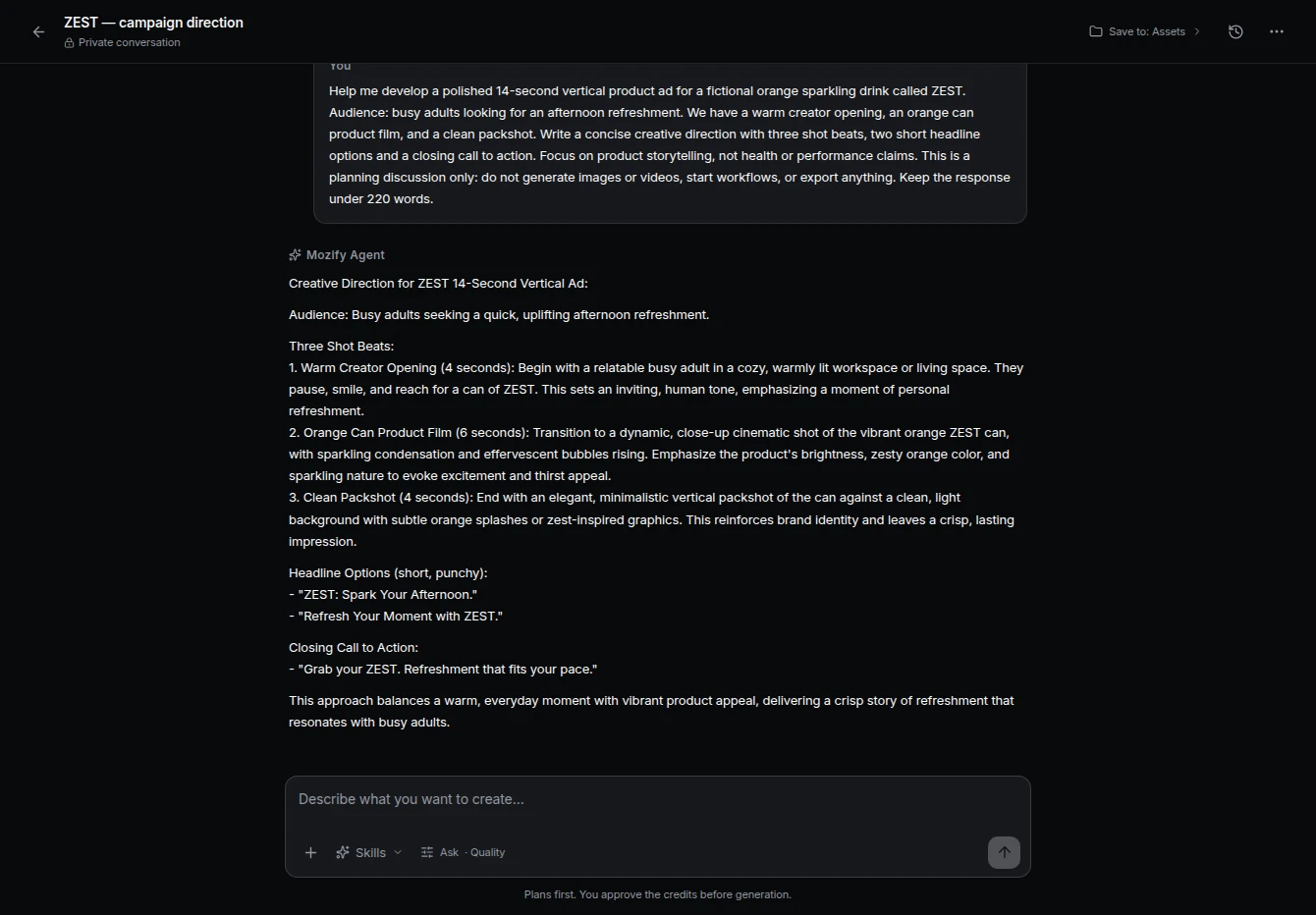
Explore reusable Workflows ↗An actual brief and campaign plan in Mozify Agent.
 Open screenshot at full size ↗
This recorded ZEST conversation shows the planning step for a fictional campaign. The linked guide follows that plan through image creation, footage generation and timeline editing, with the assets and finished sequence available to inspect.
Follow the plan through the campaign guide ↗Take a three-shot brief from plan to edit
The briefPlan a short drink ad with a presenter opening, a product close-up and a clear final offer.
Review the proposed story
Give Agent the brief and reference. Refine the shot plan and decide which assets need to be created.
Create the missing pieces
Use the relevant studios or a saved flow. Review settings and estimates, then select the results that fit the story.
Finish the sequence
Arrange the takes, add titles and audio, and preview the full ad. Adjust the timing before export.
Account for what the agent actually asks you to create
A request for one ad can lead to multiple planning steps and several generated assets. Compare the proposed shot count, images, duration and revisions rather than assuming one prompt means one unit of production.
Mozify’s plan allowances and generation quotes give you separate information: access to the workspace and the cost of the configured work. Review the current allowances, including Agent usage, and count the actual image/video jobs needed to reach an approved edit.
- New generations versus reuse of existing assets
- Plan revisions and Agent allowance
- The cost of replacing one unsatisfactory shot
Choose Mozify when you want the plan and the production controls.
Mozify is a useful Topview alternative for teams that want conversational planning, direct studio work, saved workflows and timeline editing available together. Use Agent to shape the brief, then work on the specific asset or edit that needs your attention.
Start your own brief ↗Explore free, no card required. A paid plan is required to generate and export.
Mozify vs Topview: frequently asked questions
Does Mozify have an AI agent for creative work?
Yes. Agent helps develop a brief and creative plan, with model and approval preferences. Mozify also exposes Image Studio, Video Studio, Talking Head, Workflows and the Editor for the production steps.
Can I review the work before Agent creates assets?
Use the Ask before creating approval preference to review the proposed work and estimate. In the studios, review the generation quote before confirming the configured request.
How is a saved Workflow different from an Agent conversation?
A conversation develops the brief and direction. A saved Workflow preserves a connected sequence of inputs and production steps that you can adapt and run again for another task.
Can I use existing footage in the finished ad?
Yes. Upload your media to Assets and use the selected files in the Editor with generated clips, titles and audio. You can build around useful footage you already have.
Sources & editorial approach
Written by Mozify. Competitor details are based on the official pages below, reviewed 12 October 2026. Recommendations reflect Mozify’s view of the workflows; the examples demonstrate our production process and are not comparative performance benchmarks.
- Topview Video Agent and Board overview
- Topview AI Canvas