Mozify vs MakeUGC: Campaign Workflows Compared
Make your next campaign from your own references.
A campaign brief can grow from one product photo into a set of images, a presenter video and an edited ad. Mozify is built to let you develop those assets, inspect the results and reuse the parts that work. If you are considering a MakeUGC alternative, this guide focuses on how that production process fits your team.
Explore free, no card required. A paid plan is required to generate and export.
Make your next campaign from your own references.
Choose Mozify when you want to build a repeatable process around your product references, selected models and creative decisions. Use the studios for individual assets, Workflows for connected steps and the Editor for the final sequence.
- Keep your product references close to each generation
- Reuse a saved workflow with a new brief
- Finish selected assets on an editable timeline
When MakeUGC may fit
MakeUGC is worth evaluating if a ready-made ad format, ad recreation or its Flow Agent is your preferred starting point. [2]
See the side-by-side comparison ↓Mozify vs MakeUGC: the workflow comparison
| Your task | Mozify | MakeUGC |
|---|---|---|
| Starting direction | Your product image, creative brief and selected references. | Briefs and product inputs, plus ready-made ad formats. [3] |
| Connected production | Agent planning and saved Workflows with connected inputs and generation nodes. | Flow Agent plans and runs connected ad steps. [2] |
| Images and footage | Image/Video studios, model guides and original output examples. | Image/video model access alongside UGC tools. [1] |
| Library purpose | Assets stores your uploads and generated work for reuse. | Content Library provides ad formats to recreate. [3] |
| Final assembly | Video Editor with clips, titles and audio on a timeline. | Video editing with captions, music and trims. [1] |
Official product information reviewed 12 October 2026. Model access and plan allowances can change.
Turn a recurring brief into a reusable production process
Suppose each product launch needs three visual directions and a short video. In Mozify, you can start with a Workflows template or a blank canvas, add the reference and brief, and connect planning and generation steps. Choose the models and settings for the work each node needs to perform.
A saved flow gives the next launch a starting structure. Replace the inputs, review the estimate and inspect the new outputs. You keep the useful sequence of steps while allowing the new product to need a different scene, composition or take. This is especially useful for recurring briefs that otherwise start with a new collection of prompts each time.
MakeUGC also offers connected production: its Flow Agent describes planning steps, choosing models and running the flow from a brief. Both products have workflow capabilities; the interface and review process are worth comparing with your actual task. [2]
See the Mozify Workflows canvas ↗An asset library and an ad-format library serve different jobs
MakeUGC’s Content Library lets users select an ad format, supply a product image and description, and generate a recreation. That can fit teams who want an existing format to guide the creative. [3]
Mozify Assets holds your uploaded references and generated media. Organize the source images, selected stills, footage and audio for a campaign, then select those files in supported generations or editing work. Its value grows as you build a set of approved material that the next project can use.
For a brand with a clear visual direction, that distinction matters. The starting point can remain your own packshot, setting and message. A saved workflow helps produce new variations, while Assets keeps the files you chose close to the next step.
Explore the Mozify asset library ↗Choose a model for the asset, then finish the story
An image brief and a motion brief ask different things of a model. Mozify’s model pages show selected outputs, inputs and controls so you can prepare a request for the task. In the studio, choose an enabled profile and review its quote before generating.
Once the assets are ready, use the Editor to choose what the viewer sees first, how long the product remains visible and where the offer appears. A strong campaign may combine generated footage with your original media. That final arrangement is a creative decision you can continue to revise.
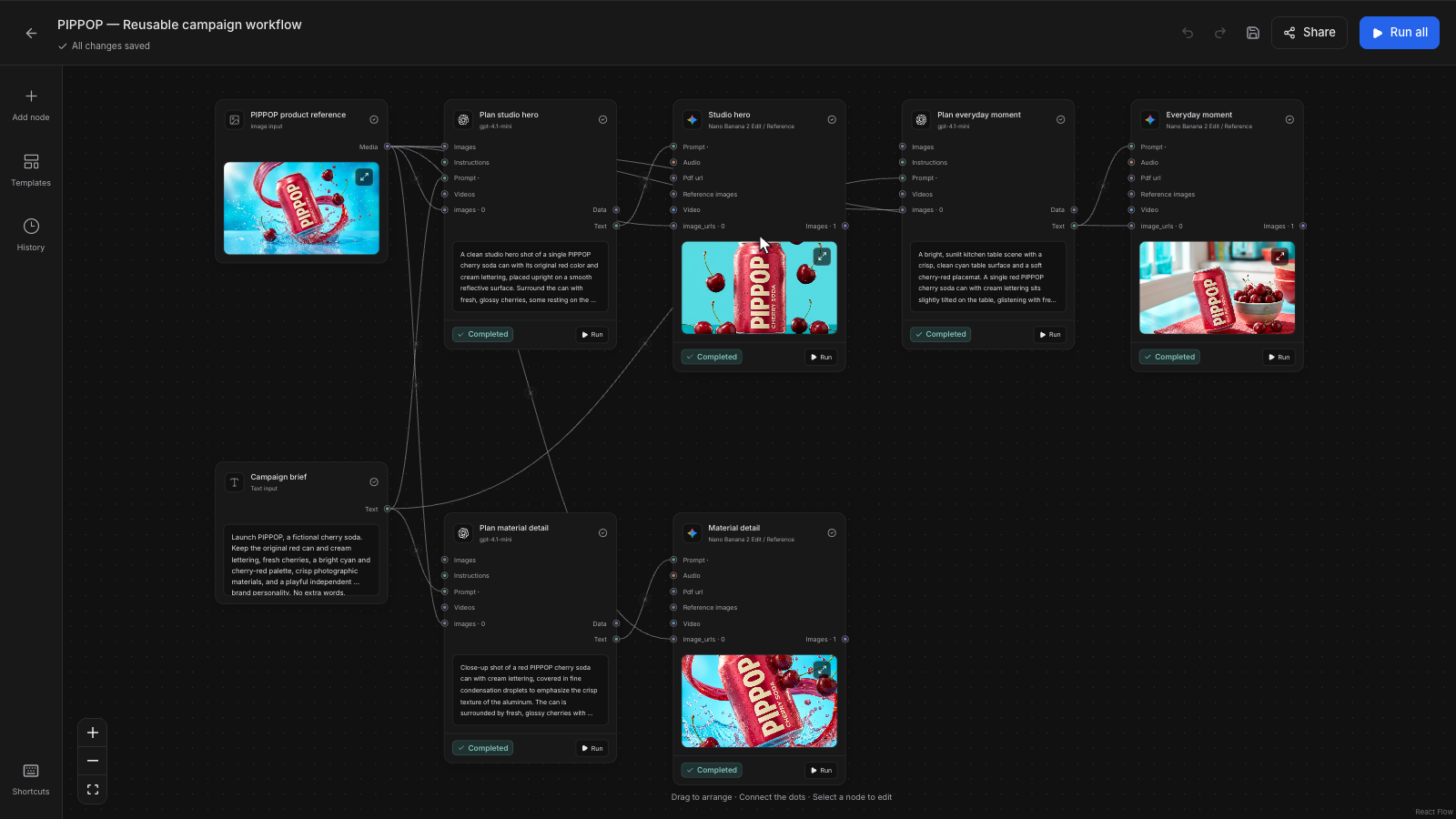
Explore model examples and input modes ↗One product reference connected to three campaign images.
 Open screenshot at full size ↗
The PIPPOP canvas is an actual Mozify workflow with its product reference, planning nodes and three completed campaign images. Follow the connections to see how the fictional drink’s reference feeds each visual direction, then open the workflow guide to inspect the outputs.
Explore the workflow and its outputs ↗Build a reusable launch flow
The briefCreate three image directions for a drink launch, select one, and develop it into a short ad.
Connect reference and brief
Place the product image and campaign direction into a saved or new flow. Choose the planning and generation steps.
Inspect the image outputs
Run after reviewing the estimate. Compare the product label, composition and headline space in each direction.
Develop the chosen direction
Use the selected image in a compatible video mode, then arrange the useful take with titles and sound in the Editor.
Price the workflow you intend to repeat
List the image outputs, video duration and presenter work in one run before comparing subscriptions. In Mozify, the estimate reflects the work you configure. More branches and additional takes increase the production you are asking for.
Measure the same finished deliverables across both tools and include the revisions needed to approve them. Inspect normal renewal terms and allowances on the current pricing pages rather than using a short promotional offer as the ongoing campaign budget.
- Number of image directions per product
- Selected video duration, format and sound
- Revisions and the next launch’s repeat run
Choose Mozify for a campaign process you can build on.
Mozify is a practical MakeUGC alternative when your own references, reusable production steps and final edit are the center of the work. Start with a repeatable image brief, keep the outputs you approve and carry that direction into video and the next campaign.
Start your own brief ↗Explore free, no card required. A paid plan is required to generate and export.
Mozify vs MakeUGC: frequently asked questions
Is Mozify a MakeUGC alternative for campaign production?
Yes. Mozify combines image/video creation, Talking Head, Agent, saved Workflows, Assets and editing. It suits teams that want to develop a campaign from their own references and keep control over the selected assets and sequence.
What does Mozify’s Assets library contain?
Your uploaded references and generated images, videos and audio. You can organize and reuse these files in the workspace. It is not a library of competitors’ ads or ready-made ad recreations.
Can I reuse a workflow for another product?
Yes. Save a workflow and adapt its reference inputs, brief and settings for the next product. Review the estimate and inspect each new result; saving the structure does not guarantee identical product fidelity across generations.
Do I need to finish every generation as a video?
No. You can use Image Studio and Workflows to create standalone campaign images, or take a selected image into a supported video mode. Use the Editor when your deliverable needs clips, titles and sound arranged into a sequence.
Sources & editorial approach
Written by Mozify. Competitor details are based on the official pages below, reviewed 12 October 2026. Recommendations reflect Mozify’s view of the workflows; the examples demonstrate our production process and are not comparative performance benchmarks.
- MakeUGC platform overview
- MakeUGC AI Workflows
- MakeUGC Content Library