
Before you start
- One product, one benefit and a next step for the viewer
- A product photo if you want to add cutaways
- A paid plan for generation and export
1. Choose your creator
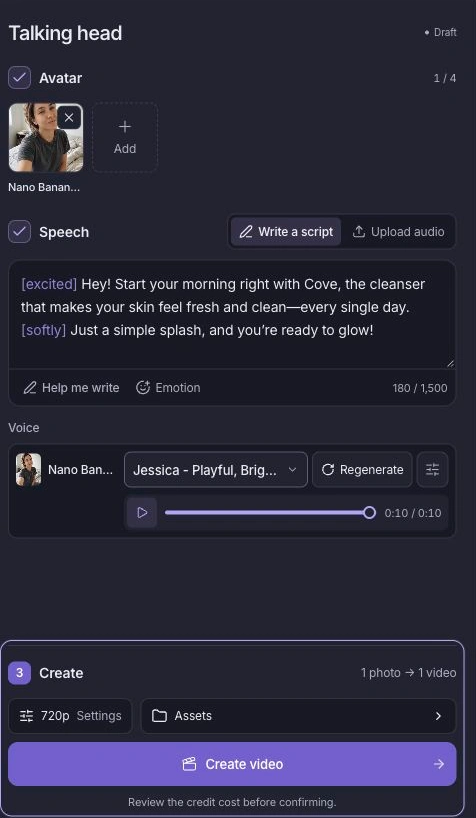
Open Talking Head. Pick an avatar that fits your audience, or use Upload image to add your own portrait. For a first ad, choose one presenter and one product message.
2. Write the message and hear it
Select Write a script under Speech. Start with a recognizable situation, explain one product benefit and finish with a clear action. Use Help me write if you want a first draft.
- Add the product, audience and benefit to your brief. Check the draft against your actual product.
- Choose a voice and use Emotion to shape its delivery. Keep the tone conversational.
- Play the voice preview. Fix pronunciation or pacing before generating the video.
3. Create your video
Choose Video settings and a save folder, then click Create video. Review the quoted credits and confirm. When the run finishes, open Recent and watch the full result.
4. Add product shots when they help
Use the presenter clip on its own, or open Video Editor to add product photos and footage. Show the product as it is mentioned, add a short call to action and export for your placement.
Keep one narration track audible through the edit. Check the final MP4 on a phone: the product, message and next step should all be clear.
Make the next variation
For a launch, introduce one reason to try the product. For retargeting, answer a common question. For a seasonal offer, state the real offer and its terms. Change one hook at a time so you can compare performance after publishing.
See the finished example 0:34
Give a product a clear story with a relatable presenter and product cutaways. This demonstration uses a fictional AI presenter.
Script, source inputs and production details →