
Mozify vs HeyGen: Avatars & Product Videos
Build a product campaign around the voice.
Some videos put the presenter at the center from beginning to end. Others need a presenter for the introduction, a product demonstration in the middle and a clear visual offer at the end. Mozify is a compelling HeyGen alternative for that second kind of production, with Talking Head, image/video creation and timeline editing in one workspace.
Explore free, no card required. A paid plan is required to generate and export.
Build a product campaign around the voice.
Choose Mozify when the presenter is part of a campaign that also needs original product images, generated footage or your own media. Prepare the speech, build the supporting visuals and arrange them around your message.
- Prepare a presenter from a portrait or library avatar
- Preview the voice or supply your own audio
- Combine the delivery with product media and titles
When HeyGen may fit
HeyGen is worth evaluating when personal avatars, script-driven presenter production or translation of existing video is the main requirement. [1]
See the side-by-side comparison ↓Mozify vs HeyGen: the workflow comparison
| Your task | Mozify | HeyGen |
|---|---|---|
| Presenter creation | Portrait or avatar selection with script and uploaded-audio modes. | Personal avatars and avatar-led video tools. [1] |
| Speech preparation | Choose a voice and preview speech before creating the video. | Voice Director and Voice Mirroring in AI Studio. [2] |
| Supporting scenes | Generate product stills and footage, or upload your own media. | AI Studio includes B-roll and other visual elements. [2] |
| Editing approach | Arrange clips, titles and audio on a video timeline. | Script-driven AI Studio with delivery and gesture controls. [2] |
| Existing-video translation | The documented Talking Head workflow creates new videos from prepared speech or audio. | A dedicated Video Translation product. [3] |
Official product information reviewed 12 October 2026. Model access and plan allowances can change.
Decide what the presenter needs to do in your video
If your brief is a product launch, the presenter may only need to introduce a benefit and connect the shots. Mozify Talking Head lets you start from a chosen portrait, prepare the script and voice, or upload audio you already have. The rest of the workspace supplies the media around that delivery.
For example, an app launch can open with a spoken introduction, cut to a real screen recording and close on a title. A physical product campaign can replace the screen recording with a reference-based scene or approved product footage. Choose the presenter’s role before deciding how much of the video should remain a talking head.
HeyGen’s AI Studio emphasizes control through a script, including speech and gesture tools. That approach deserves consideration for work where presenter delivery carries most of the video. [2]
Explore Talking Head inputs and examples ↗Give each product detail the right kind of media
Use the strongest source for each shot. A real recording should demonstrate an actual interface. Approved photography can show exact packaging. Image and video generation can create a campaign setting, an atmosphere or a supporting scene. Mozify lets you keep those different media in Assets and combine them in the Editor.
This flexibility matters when the deliverable expands. The same project may need a still image for a feed post, a short product film and a presenter-led ad. You can work on each asset in its relevant studio, then reuse the selected pieces across edits. The workspace follows the campaign’s deliverables rather than requiring every output to start as a presenter video.
See workflows for apps and SaaS ↗Treat video translation as its own requirement
HeyGen has a dedicated translation product covering translated speech, lip synchronization and subtitles. If translating an existing presenter library is the main task, evaluate that specific workflow and its current plan terms. [3]
Mozify’s Talking Head flow can create a new presenter video from prepared speech or uploaded audio. That is a different task from translating an existing finished video. For a product campaign, decide whether you need new creative assets or localized versions of existing footage, then compare the tools on that exact deliverable.
See how to prepare speech in Mozify ↗Prepare and preview the speech in the actual studio.
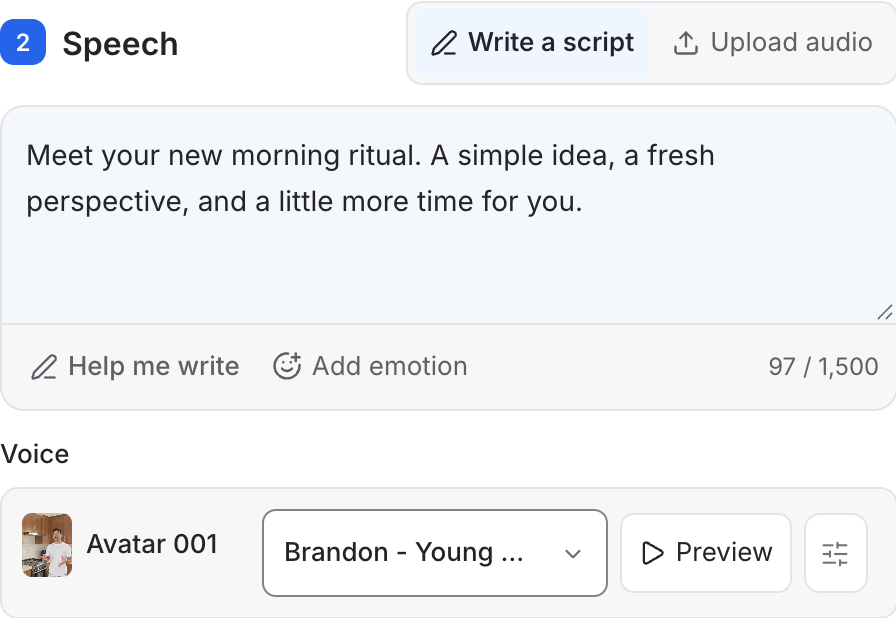 Open screenshot at full size ↗
This screenshot shows Mozify’s Talking Head speech controls with a selected avatar. The script, voice selection and Preview action are part of the preparation step. The linked guide also includes a finished fictional presenter example with its original narration.
See the complete Talking Head workflow ↗Make a short product explainer
The briefIntroduce a new app feature with a presenter opening, a real screen recording and a final call to action.
Prepare a clear introduction
Choose the portrait, write the opening and preview the voice. Keep the wording aligned with what the feature actually does.
Bring the product evidence
Upload the real screen recording and any approved artwork. Generate supporting imagery only where it helps the explanation.
Time the explanation
Place the presenter and screen recording on the timeline, add titles and preview the audio against the demonstration before export.
Compare equivalent video tasks
Presenter duration, speech preparation, image/video generations and final revisions all affect the work required. Compare a new product explainer with another new product explainer; an existing-video translation is a different production task.
For Mozify, review the current plan allowance and the quote for each generation you configure. If you already have the product footage and narration, include that reuse in the brief. It gives you a more useful estimate than assuming every element must be newly generated.
- New presenter creation versus translation of existing footage
- The same finished duration and supporting visuals
- Speech, visual and final-edit revisions
Choose Mozify when the product needs as much attention as the presenter.
Mozify is a strong fit for a campaign that combines a voice, a product and a finished visual sequence. Prepare the presenter, create or upload the evidence around the message and keep control over the final edit in the same workspace.
Start your own brief ↗Explore free, no card required. A paid plan is required to generate and export.
Mozify vs HeyGen: frequently asked questions
Is Mozify a HeyGen alternative for product videos?
Yes, particularly when the brief combines a presenter with product imagery, footage and timeline editing. Mozify’s Talking Head sits alongside Image Studio, Video Studio, Assets and the Editor.
Can I use recorded narration instead of generated speech?
Yes. Talking Head has an uploaded-audio mode. You can also write a script, select a voice and preview the speech before creating a presenter video.
Can Mozify translate an existing presenter video?
Mozify’s documented Talking Head flow creates a new video from a portrait and prepared speech or uploaded audio. It does not provide the existing-video translation process described in this comparison. For that task, evaluate HeyGen’s dedicated Video Translation product.
Can I include actual product screenshots and recordings?
Yes. Upload your files to Assets and use them in the Video Editor with the selected presenter take, titles and audio. Real captures are appropriate when the video demonstrates how your app works.
Sources & editorial approach
Written by Mozify. Competitor details are based on the official pages below, reviewed 12 October 2026. Recommendations reflect Mozify’s view of the workflows; the examples demonstrate our production process and are not comparative performance benchmarks.
- HeyGen personal avatars and platform overview
- HeyGen AI Studio
- HeyGen Video Translation